Use VBVoice Call Detail Recording to associate additional information with a call and to store this information in the VBVRLog. You can access the log files in real-time or off-line using a custom ADO object. The ADO object can be configured to return as many call detail types as required.
Each Call Detail record consists of a Call Detail integer ID and a Data string. Call details can be added to the call as required. The ID number is used when accessing call details from the VBVoice ADO object.
The call details are stored in the VBVoice log file, with a .VLG extension. In addition, an entry is stored in the log index file (.VLI extension). The index file is required to access the data from the ADO object.
Read about ADO Objects.
The ADO object provides real-time and historical access to the call detail data. It provides the following fields:
|
Unique Call ID |
Each call is assigned a Call ID which is guaranteed to be unique for that day. |
|
Call Start Time |
The start date of the call. The year of the call is retrieved from the log file date; the day and month are retrieved from the log file name; the time is embedded into each log entry. |
|
Call Duration |
The duration in seconds of the call, from off-hook to completion of call processing. |
|
User-Defined Call Detail Fields |
See Call Detail records below. |
There are two types of call details - Primary and Secondary.
They are treated identically except for the manner in which they are displayed in VBVRLog. See below for an example. Both kinds of call details are listed in the ADO recordset.
|
Primary Call Details |
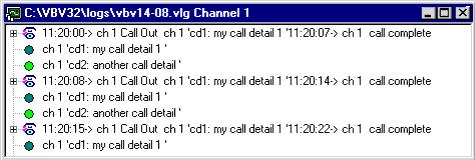
Primary call details are displayed on the first line of the call in VBVRLog, so they can be seen in unexpanded mode in the log window. |
|
Secondary Call Details |
Secondary call details are listed as they occur in the call-flow. |
To add a call detail, use this code:
Dim log as VBVLog
Set log = new VBVLog
log.AddPrimaryCallDetail channel, 1, "call detail 1"
log.AddSecondaryCallDetail channel, 2, "another call detail"
For greater efficiency, declare the mylog object as a form variable, and create it once in Form.Load.
This method should be called in or after the LineGroup Exit event and in or before the LineGroup Disconnect event.
The Call Detail ID number (1 or 2 in the examples above) define which fields will contain the data in the VBVoice ADO object.
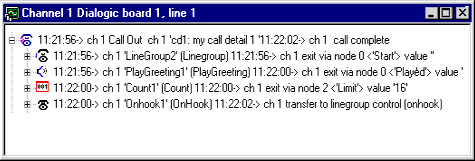
When a log file is opened from the VBVRLog, the initial view shows both primary and secondary call detail types. When logs are opened from a file, the default view shows each call and its associated call details. Each call detail consists of two parameters: an integer type field, and a string field.
The image below displays current log activity in VBVRLog (default, partially expanded view):
The image below displays a log file loaded into VBVRLog (default, unexpanded view):